BitTorrent® Remote1.0.20111104
Publisher Description
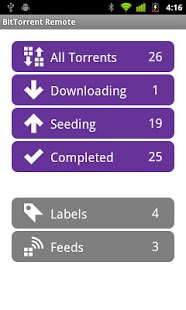
Discover and download on your home computer from anywhere.
What is BitTorrent® Remote?
BitTorrent Remote is a simple and secure app that enables you to access BitTorrent on your home computer from anywhere. Just create an account from BitTorrent on your computer and you're done. There's no complicated network setup required.
Want to download torrents directly to your Android device? Download BitTorrent® for Android here: http://bit.ly/1fWaXdi
Features:
Add, remove, start, stop downloads on your home computer
Check download progress
Check your RSS feeds
Automatically add torrents to your home BitTorrent client from your mobile browser
Shift completed downloads to your Android device for local playback
How do I get started?
View more detailed instructions at https://remote.bittorrent.com/signup
By downloading or using this app, you agree to the Terms of Use (http://www.bittorrent.com/legal/terms-of-use) and Privacy Policy (http://www.bittorrent.com/legal/privacy)
Support and feedback? btandroidremote@bittorrent.com
About BitTorrent® Remote
The company that develops BitTorrent® Remote is BitTorrent, Inc.. The latest version released by its developer is 1.0.20111104. This app was rated by 1 users of our site and has an average rating of 3.0.
To install BitTorrent® Remote on your Android device, just click the green Continue To App button above to start the installation process. The app is listed on our website since 2013-12-23 and was downloaded 71 times. We have already checked if the download link is safe, however for your own protection we recommend that you scan the downloaded app with your antivirus. Your antivirus may detect the BitTorrent® Remote as malware as malware if the download link to com.bittorrent.android.btremote is broken.
How to install BitTorrent® Remote on your Android device:
- Click on the Continue To App button on our website. This will redirect you to Google Play.
- Once the BitTorrent® Remote is shown in the Google Play listing of your Android device, you can start its download and installation. Tap on the Install button located below the search bar and to the right of the app icon.
- A pop-up window with the permissions required by BitTorrent® Remote will be shown. Click on Accept to continue the process.
- BitTorrent® Remote will be downloaded onto your device, displaying a progress. Once the download completes, the installation will start and you'll get a notification after the installation is finished.
Program Details
System requirements
Download information
Pricing
Version History
version 1.0.20111104
posted on 2013-12-23
Added missing library.
version 1.0.20111104
posted on 2013-01-30
Several fixes and updates
